Word Search Generator
Type your own words and print a word search puzzle in seconds. Choose the grid size and whether words can run diagonally. Free, with an answer key, no sign-up.
How to make a word search
- Type your words in the box, separated by commas or one per line. Spelling words, science vocabulary, holiday words or the names of the children in your class all work.
- Choose the grid size: 10 x 10 for younger children or short lists, 12 x 12 for most lists, 15 x 15 for longer lists and older children.
- Turn diagonal words on or off. With diagonals off, words run only across and down (and backwards), which is easier to search.
- Press Create. The words are placed at random and the empty squares are filled with letters. Press Download PDF or Print. Press Create again for a new arrangement of the same words.
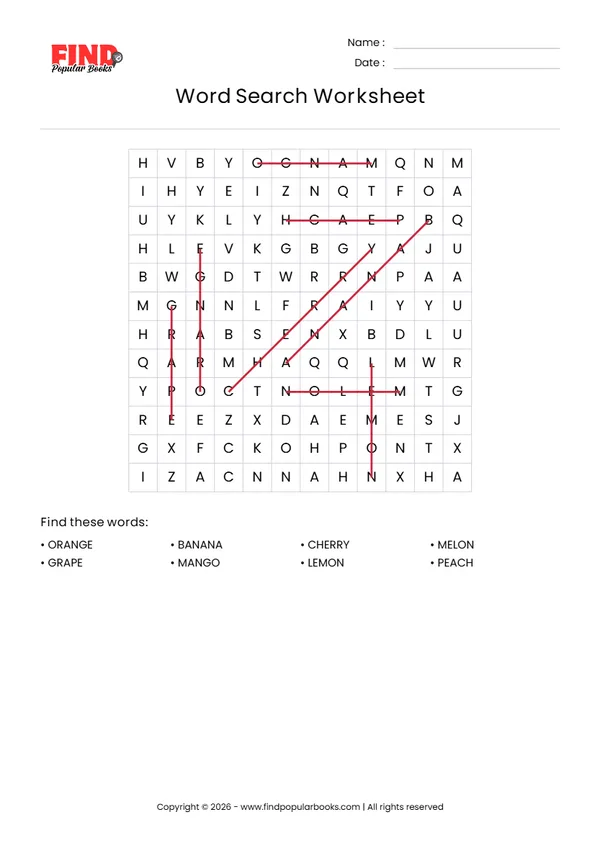
- Press Show answers to see every word circled with a line, and print that page as the answer key.
Why word searches are good practice
A word search looks like a simple game, but finding a word in a grid of letters makes a child hold the spelling in mind and compare it letter by letter. That is real spelling practice, and it does not feel like work. Scanning rows and columns also trains visual attention, which helps with reading.
Because you choose the words, the puzzle can follow whatever your child is learning: this week's spelling list, a set of sight words, the planets, the parts of a plant or new words from a story.
Settings for different ages
Kindergarten and 1st grade: 6 to 8 short words, a 10 x 10 grid, diagonals off. Write the words in capital letters to match the grid.
2nd and 3rd grade: 8 to 10 words, a 12 x 12 grid. Diagonal words make it a little harder.
4th grade and up: 12 or more words, a 15 x 15 grid, diagonals on. Longer words with similar spellings make a good challenge.
Ideas for using your word search
- After finding each word, ask your child to write it on the back of the page or use it in a sentence.
- Make a class puzzle with every child's name. It is a favourite on the first days of school.
- Hand it out as an early-finisher activity or a calm rainy-day task.
- Use theme words for holidays and seasons: autumn, Halloween, Thanksgiving, winter or spring.
Using word searches at home and in class
At home, let your child choose the words: favourite animals, characters from a book or places from your last trip. Children work harder on a puzzle they helped to make. In class, a word search with the week's vocabulary is a good start to a new topic, because children meet every key word before the lesson. You can also print two puzzles with the same words and different grids, so neighbours cannot simply copy each other, and use the answer key to check work quickly at the end of the day.
What is on the printed page
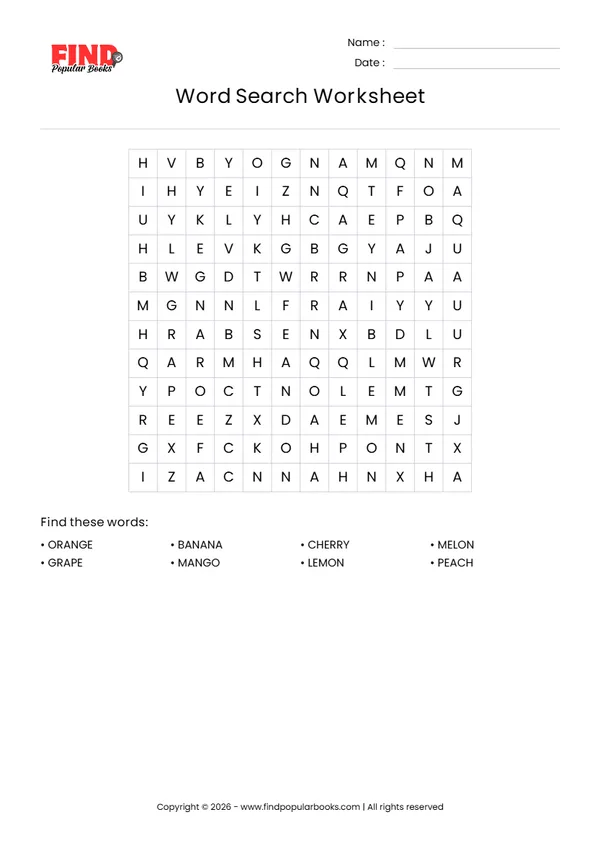
The page shows a title, a name and date line, a large letter grid in a clear font, and the list of words to find under it. It prints well in black and white on any printer.
Example word search worksheets
Frequently asked questions
How many words can I use?
Use as many as fit the grid. Around 8 words suit a 10 x 10 grid, 10 to 12 words a 12 x 12 grid, and up to about 15 words a 15 x 15 grid. Very long words need a larger grid.
Can words go backwards or diagonally?
Words can run across, down and backwards. Turn on Allow diagonal words to add the four diagonal directions too.
Is there an answer key?
Yes. Press Show answers to see every word marked in the grid, then print or download that page.
Are my words saved?
No. The puzzle is made in your browser and your words are not sent to us or stored.
Ready-made word searches and spelling worksheets
CVC Sentence Mix-Up | 6 Read and Write Worksheets
CVC Picture Scramble | 5 Short-Vowel Worksheets
CVC Word Scramble Worksheets | Five Short Vowels
Halloween Draw and Write: 12 Picture Prompt Worksheets
Sight Word Sentences: 50 Illustrated Reading Strips
Change One Sound | 6 CVC Picture Word Worksheets
Sight Word Apple Workshop: Read, Trace, Spell and Write
Sight Word Steps: Read, Trace and Write